
Understanding the Virtual Environment
Windows Virtual Desktop is a great tool to help you optimize your productivity and security, wherever you are located. Check out the power of virtualization when you work remotely with Windows Virtual Desktop.

The top 9 ways Microsoft IT is enabling remote work for its employees
Companies recently experienced a huge shift from in-office work to remote. Microsoft quickly took action to help make working remote more efficient and flexible. With Windows Virtual Desktop and best practices, companies can continue giving employees who work remotely a productive and secure experience. Check out nine additional ways Microsoft enabled their employees to work wherever, with a productive and secure experience.
Why Trust Windows Virtual Desktop?
Microsoft employs more than 3,500 security experts completely dedicated to your data security and privacy. Work confidently and know your organization’s data is safe when you use Windows Virtual Desktop. Click here to find out how, and contact Maureen Data System (MDS) to learn more.
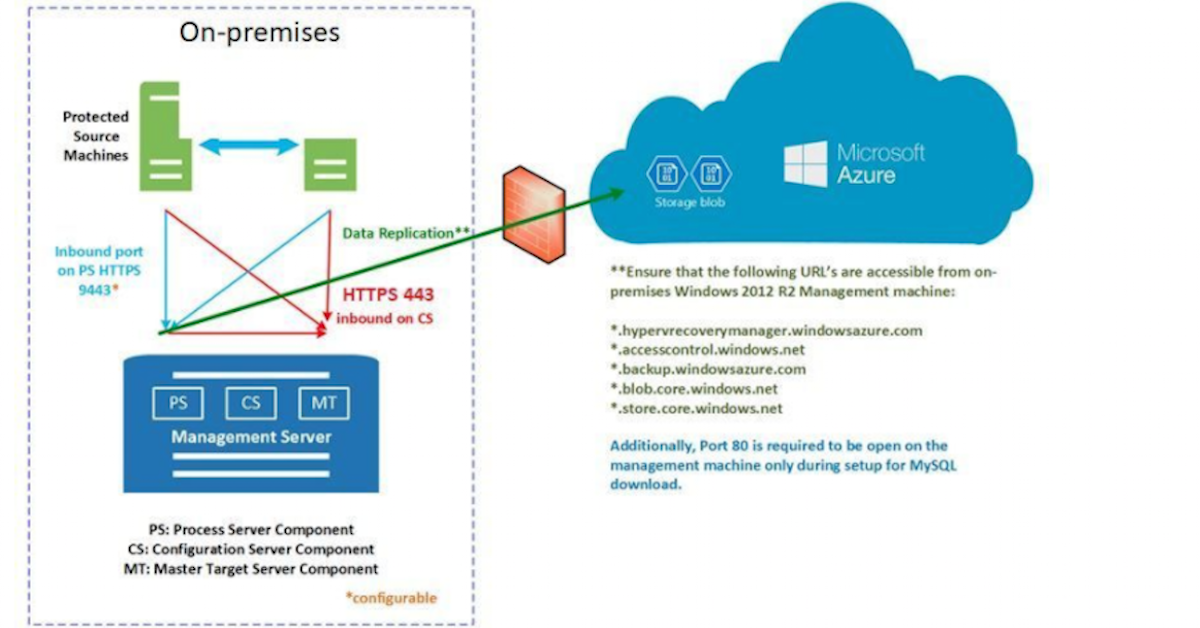
Just move it to the cloud
How you migrate your data to the cloud depends on many factors, but #Microsoft is here to help. Learn from this blog post about different methods of data migration and which one may be best for you.

Cerner drives customer confidence, improves security and compliance posture with Microsoft 365
#Cerner’s life blood is healthcare information, and #Microsoft solutions like 365 E5 help them manage that information securely. Read more here:

Commvault boosts capacity and performance with Windows Server and Azure
When you leverage Azure Hybrid Benefit while running Windows Server on @MicrosoftAzure, you can save on cost, free up capacity, and boost performance. Learn more with this short video about Microsoft customer #Commvault:
Building a Resilient Organization through Integrated Cloud-based IT
Want to learn about and improve your organization’s security posture? In this case study, learn about the 3 stages of Microsoft 365 adoption as related to productivity, collaboration, and endpoint management tools. Manage your digital transformation with the knowledge provided by experts.
Subscribe to stay connected. We’ll help you accelerate innovation and stay up to date on the latest Microsoft 365 tooling for integrated cloud-based IT.
Host your .NET application and data on the most cost-effective cloud
Optimize costs so your resources are better spent on increasing operational efficiencies, supporting new business priorities, and improving customer experiences. With Microsoft Azure, you can reduce costs, operate confidently, and evolve quickly.
Sign up to stay informed on the latest cloud computing trends and learn more about migrating your apps and data to Azure—the most cost-effective cloud
Modernize Endpoints A Zero Trust approach
Microsoft Zero Trust is a security model built on Microsoft intelligent security cloud and endpoint leadership. Remediation (with Microsoft Defender for Endpoint integration) and device configurations optimized for Zero Trust are all part of the journey. With the Zero Trust approach, you build a solid foundation with policy enforcement that has context about people and endpoints.
Review the infographic for a breakdown and get a link to sign up for an Endpoint Management workshop.
Strengthening connection with remote communities with Windows 365
The coordination of moving employees around to better serve the people in remote areas of Nunavut, Canada, and provisioning hardware for remote, nontechnical staff was challenging for IT—even before the challenges of Covid-19. Now, with Windows 365, Nunavut deploys virtual endpoints to an employee’s device using Microsoft Endpoint Manager. As a result, the government can support both organization owned and Bring Your Own Device (BYOD) models, and it can get users up and running with personalized, highly secure cloud PC service.